
.png?width=40&name=photos%20team%20(22).png)
Your pipeline report says $2.4M. Your gut says something is off. Your VP of Sales hasn’t mentioned the forecast number in two weeks.
You’re probably right to be suspicious.
In our experience working across dozens of HubSpot portals, pipeline data is almost never as reliable as it looks. The numbers are technically there. The deals are logged. The stages are filled in. But underneath the surface, the data structure was set up once — usually during the initial HubSpot onboarding — and never meaningfully revisited.
The result is a forecast that’s accurate on paper and useless in practice.
The Pipeline Problem Nobody Talks About
Most pipeline problems get diagnosed as sales problems. Reps aren’t updating their deals. Close dates keep slipping. The forecast is always optimistic. Leadership loses faith in the number.
But the real issue is almost never the people. It’s the structure they’re working inside.
When deal stages don’t have clear exit criteria — when “Proposal Sent” means something different to every rep — the pipeline becomes a reflection of individual interpretation, not business reality. When close dates are treated as aspirational rather than committed, the forecast stops meaning anything. When stage probabilities were set at implementation and never updated against actual win rates, the weighted pipeline is fiction.
These aren’t discipline problems. They’re design problems. And they’re fixable.
What We Found in a Real Portal
|
The following is a real client scenario, shared with permission and anonymised. |
A B2B SaaS company came to us earlier this year. A growing sales team, HubSpot Sales Hub Professional, and a pipeline they’d been running for two years. On the surface, everything looked fine: 200+ open deals, stages defined, activity being logged.
We ran a basic pipeline audit. Here’s what we found:
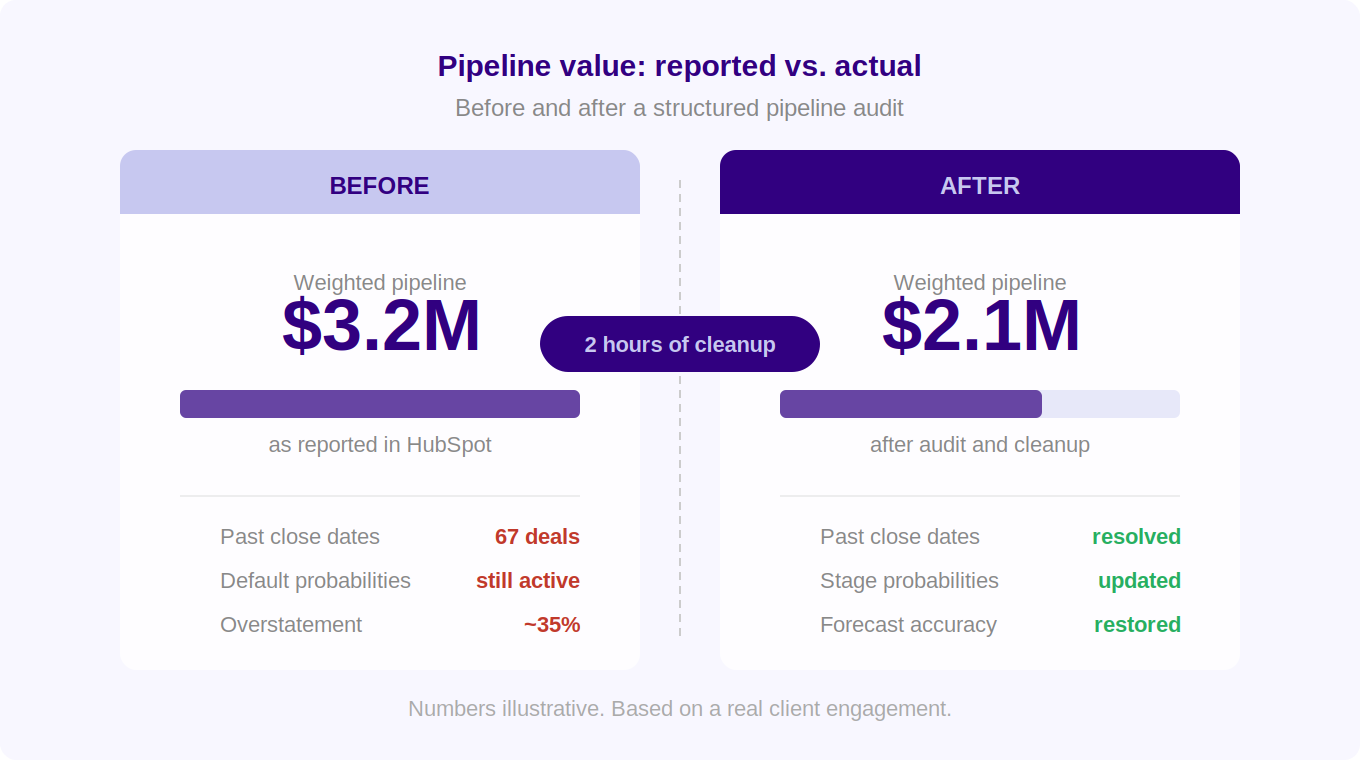
- 67 open deals had a close date in the past — some by more than six months. Nobody had flagged them.
- Deal stage probabilities were still set to HubSpot defaults from the original implementation. Their actual close rate at “Contract Sent” was 71%. HubSpot was calculating it at 90%.
- Three of their five deal stages had no agreed entry or exit criteria. Reps were moving deals based on feel, not fact.
- The “Discovery” stage contained deals ranging from a 15-minute intro call to a six-month evaluation. Same stage, completely different commercial realities.
The weighted pipeline was overstated by roughly 35%. The VP of Sales had stopped referencing it in board meetings. He was running his own spreadsheet on the side.
Two hours of structured cleanup and one team conversation later, the forecast was credible again. No new tools. No new headcount. Just clarity on what the data was supposed to mean.
How to Diagnose Your Own Pipeline in 10 Minutes
You don’t need a full audit to know if you have a problem. These three checks will tell you most of what you need to know.
Check 1: The past close date test
Go into HubSpot. Open your deal view. Filter by Deal Stage = any open stage, Close Date = before today. Count the results.
If that number is more than 10% of your open pipeline, you have a data hygiene problem, not a sales problem.
Past close dates aren’t just messy data — they’re a sign that close dates aren’t being treated as meaningful commitments. Which means the forecast built on them isn’t meaningful either.
Check 2: The stage probability audit
Pull your closed-won deals from the last 12 months. Group them by the stage they were in 30 days before closing. Calculate what percentage of deals in each stage actually closed.
Now compare that to the probability percentages currently set in HubSpot. If your “Negotiation” stage has a 60% probability in HubSpot but your actual close rate from that stage is 82%, your weighted pipeline is being systematically understated. If it’s the reverse, you’re overstating.
Most teams have never done this. The defaults from implementation are still running.
Check 3: The stage definition test
Pick any deal stage in your pipeline. Without looking at any documentation, ask three different reps: “What has to be true for a deal to be in this stage?”
If you get three different answers, your pipeline is measuring three different things at once.
This is the most common pipeline problem we see, and the hardest to spot from a dashboard. The data looks consistent. The underlying interpretation isn’t.
How to Fix It
The good news: pipeline accuracy problems are almost always fixable without new software, new headcount, or a major process overhaul. Here’s where to start.
Step 1: Clean up past close dates
Run the filter from Check 1. For every deal with a past close date, make a decision: update the close date to reflect current reality, move the deal to a more appropriate stage, or mark it as closed lost if it’s genuinely dead.
Don’t just push dates forward. Have the conversation with the rep about what’s actually happening with each deal. The clean-up process surfaces stalled deals that nobody has been managing.
Step 2: Update stage probabilities
Use the calculation from Check 2. Update each stage probability in HubSpot to reflect your actual historical close rates. Do this once, then review it quarterly.
This single change can dramatically improve forecast accuracy without touching anything else.
Step 3: Define stage exit criteria
For each deal stage, define one or two things that must be true before a deal can move forward. Not activities — outcomes. Not “call scheduled” but “budget confirmed.” Not “proposal sent” but “proposal reviewed by decision maker.”
Document these in HubSpot’s deal stage descriptions so they’re visible every time a rep moves a deal. One hour of work. Lasting impact.
Step 4: Agree on what a close date means
This sounds trivial. It isn’t. Get your sales leadership team in a room — or a call — and agree on one definition: is a close date the date you expect to receive a signed contract, the date you expect to send a proposal, or the date you expect verbal commitment?
There’s no universally right answer. But there needs to be one answer, agreed on by everyone. Once that’s settled, close date discipline follows naturally.
What Good Looks Like
When pipeline hygiene is working properly, a few things become noticeably different:
- Sales leadership references the HubSpot forecast number in board meetings instead of a parallel spreadsheet.
- Close date changes require a conversation, not just a click. Reps know why.
- The weighted pipeline moves predictably as deals progress — no more surprise end-of-quarter gaps.
- New reps can look at a deal and immediately understand where it is and what needs to happen next.
Want us to run these checks on your HubSpot pipeline?
We offer a free 30-minute pipeline review — a live look at your HubSpot data and an honest read on what’s working and what isn’t. No slides. No pitch.
Book your free 30-minute pipeline review →
.png?width=80&name=photos%20team%20(22).png)
Comments